Thursday, November 12, 2009
Differently-abled
Wednesday, November 11, 2009
Icon Archive
Here are the steps:
1, Go to this website: Icon Archive
2, Browse to the icon image you would like to use such as a star under the category 'kids then subcategory shiny'.
3, Click on Download.ico
4, Then save.
5, Save it to a folder on your computer you create titled, “Icons”.
6, Now save the website such as FunSchool to your desktop. http://funschool.kaboose.com/arcade/index.html The easiest way to do this is to drag the icon in front of the address to your desktop.
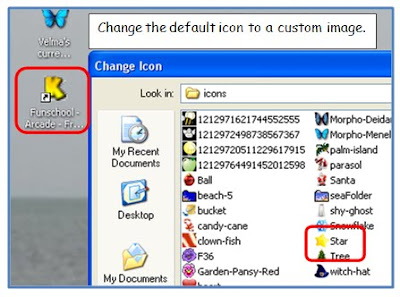
7. Once you have the shortcut on your desktop, then right click on the shortcut and go to properties. Under the web document tab, go to change icon.
8. Click Browse and go to your icon folder and select the star you saved.
Note: you can do the same thing to customize a folder. Right click on a folder and go to properties. Go to the Customize Tab and then select Change Icon.
![]()
Enjoy making your desktop reflect your personality or using icons for your making it easy for young readers to navigate.
tags: icons, graphics, icon, webdesign, clipart
Posted from Diigo. The rest of my favorite links are here.
Monday, November 9, 2009
Google Squared

Try out Google Squared! It will generate a spreadsheet of data for you when you enter a search term. Try to enter the term: US States and then watch the data creation.
Think about ways you can have students compare and contrast the data found in the charts. Remember when we ask students to identify the basic information from the charts, then we have the lowest level on Blooms. However, we could sort this data by deleting cells we do not want (clicking on the x in the upper right of the column) and then exporting it into a .csv file which stands for comma-separated value format or simply put, you can export it to Excel or any other spreadsheet application. Try it out. Explore ideas with your students!
MAP Testing Student Links
Try out these great educational student links:
Click here for Math activities by RIT Range and tested category.
click here for Reading activities by RIT Range and tested category.
Words To Live By
How frequently do we give ourselves permission to just enjoy ourselves during our busy day?
I challenge you to take time today to enjoy a moment with a child. Take time today to enjoy a moment just for yourself.
Here are a few words of inspiration I always have posted at my desk.
Friday, November 6, 2009
The Fun Theory

-
Watch the piano staircase video! How cool is this? Why do people do things the same old way? Why do people tend towards what is easy? Can change impact behavior?
Can we apply this theory to education? Can we make learning fun? Do we, as educators, have an obligation to educate our students and make learning so engaging they chose to do the right things such as recycling, taking the stairs, and throwing away trash?? Watch these videos and think about it!! I challenge each one of you to take this philosophy into your classrooms every single day! What can you do to apply the fun theory into your classrooms?
tags: fun, Interactive, theory, change, education, funtheory,
Posted from Diigo. The rest of my favorite links are here.
Tuesday, November 3, 2009
ClustrMaps
If you would like to add a map tracker to your blog or wiki, simply click on the map to the right and fill in the information at the top. There are step by step directions on how to add the html code to your site.
Enjoy seeing who visits your site.